The general ledger, tested in full — without uploading it.
A Windows application for audit teams. Import the ledger, run 132 analyses across 12 audit areas on your own machine, open any figure down to its entries, and export the working papers to Excel.
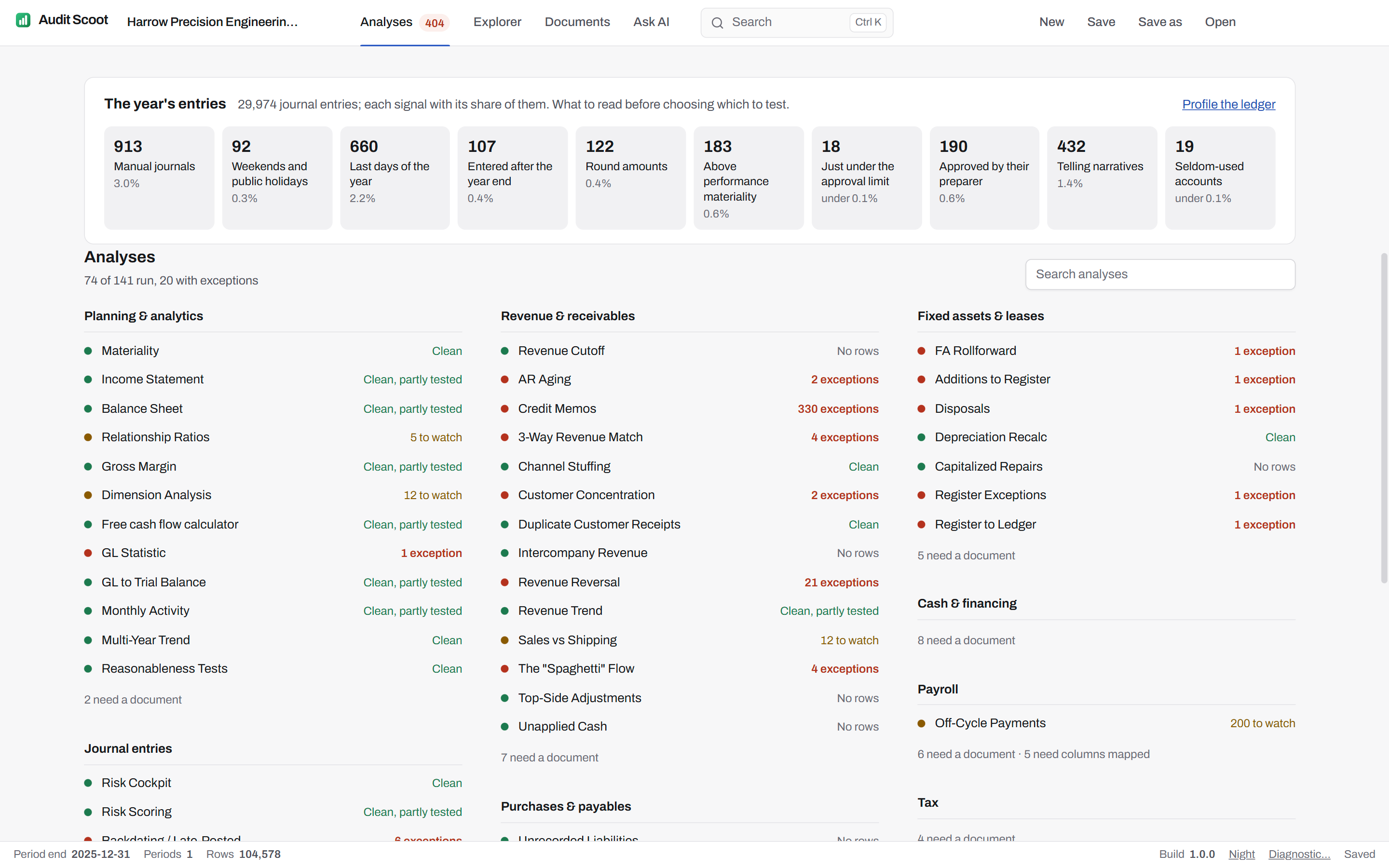
The application itself, on its fictional demo engagement: Harrow Precision Engineering Ltd, year ended 31 December 2025, after "Run all analyses".
- Windows desktop application
- No ledger row sent to AI
- 132 analyses in 12 areas
- Every line of the population
- Unlimited users
From the client's export to the audit file.
Three setup steps, then every analysis at once. Each result keeps its route back to the journal line, states what it tested, and goes into the file as a worksheet you can re-perform.
Journal entry testing on every line, by the criteria ISA 240 and AS 2401 point to. Reads ledger exports from Xero, QuickBooks Online, Sage 50, NetSuite, Microsoft Dynamics 365 Business Central and SAP, and any system that exports one row per journal line.
- 1
Import
The whole ledger, one file per period, without splitting it into Excel-sized pieces — or start next year from last year's engagement.
- 2
Columns & accounts
Map the export's columns once and put every account on a statement caption, from the chart of accounts of the client's country.
- 3
Materiality
Set the thresholds every analysis binds, argued from the ledger's own benchmark.
- 4
Analyses, Explorer, Documents
Run every analysis at once, open any figure to its entries, and load the client's documents for the tests that need them.
- 5
Export to Excel
One indexed workbook: each source file's SHA-256 fingerprint, the ledger's control totals, and every worksheet filed by area.
132 analyses, filed as an audit file is.
Twelve areas, indexed A to L — the letters that reference each worksheet in the exported workbook. 65 run on the ledger alone; the rest test the client document they need.
- Planning & analyticsMateriality, Income Statement, Balance Sheet12
- Journal entriesRisk Cockpit, Risk Scoring, Backdating / Late-Posted21
- Revenue & receivablesRevenue Cutoff, Confirmations, AR Aging20
- Purchases & payablesUnrecorded Liabilities, Accruals Listing, Supplier Statement Reconciliation19
- InventoryCount Variances, Inventory Cut-off, NRV Testing7
- Fixed assets & leasesFA Rollforward, Additions to Register, Disposals12
- Cash & financingBank Reconciliation, Bank Confirmations, Bank and Ledger Unmatched8
- PayrollPayroll to Ledger, Ghost Employees and Leavers, Pay Changes and Overtime9
- TaxVAT Returns to Ledger, Tax Charge Proof, Deferred Tax4
- Equity & legalEquity and Resolutions, Litigation and Provisions, Director Loan Accounts4
- IT controlsAccess Lifecycle, Super-User Activity, SoD Violations4
- CompletionSubsequent Events, Going Concern Indicators, Adjusted Trial Balance12
Start from any figure. Arrive at its entries.
The Explorer pivots the ledger by caption, account, month, journal type or user, and keeps going down to the journal. Profile any slice — risk signals, value bands on your materiality, Benford's first digits, who posts when — then draw a monetary-unit sample a reviewer can draw again.
Inside the Explorer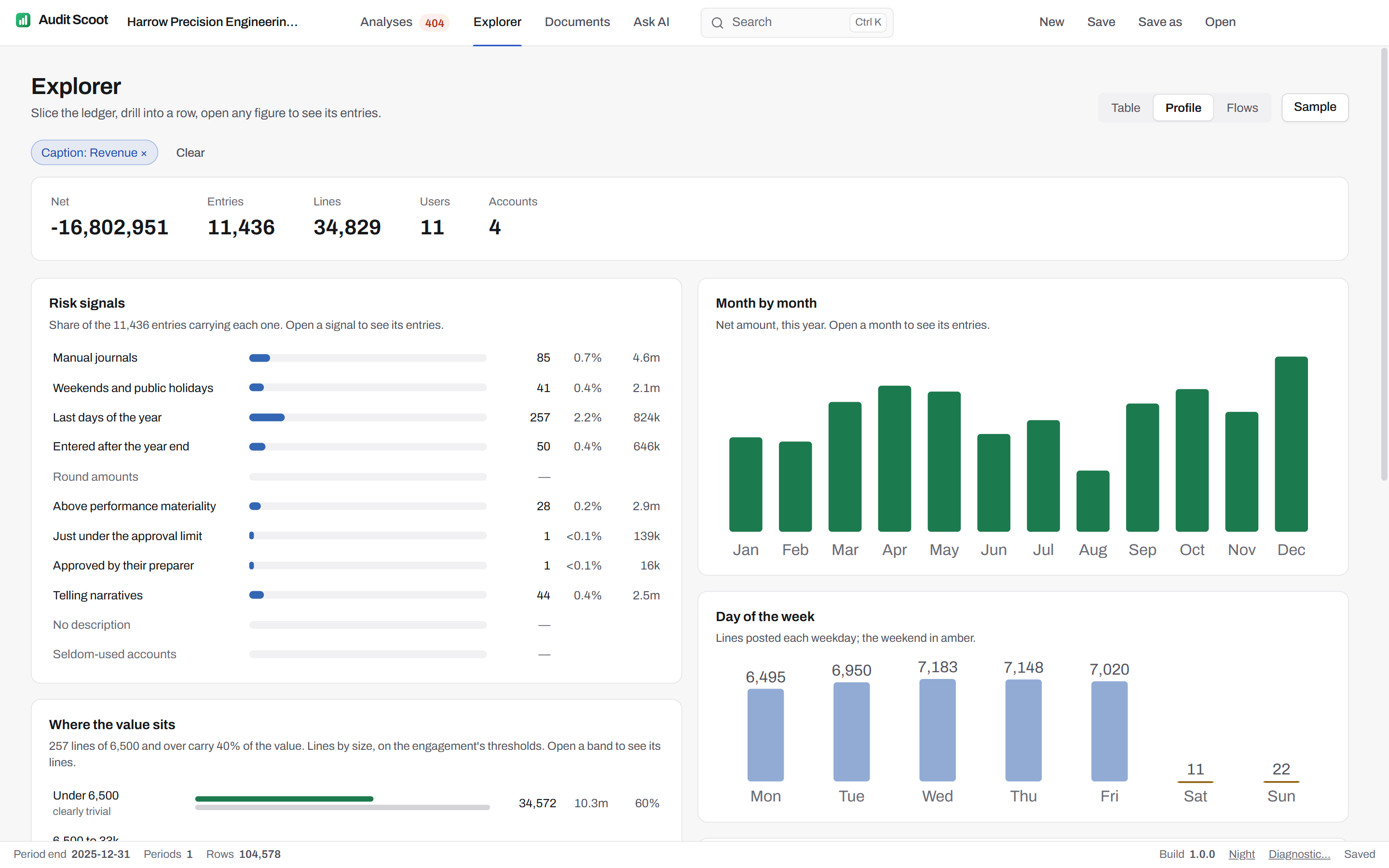
Why not just give the ledger to Claude or another AI?
Because a chat model and an audit testing workflow solve different problems. Audit Scoot uses AI only to help formulate a test; the full population is evaluated locally by a repeatable query, with evidence that a reviewer can inspect and rerun.
Bounded data scope
Journal rows, balances, names and narratives remain local. The model receives your question and a profile of the columns, not the ledger population.
Repeatable testing
A validated query applies the same rule to every row and is kept with the engagement, so it re-runs without the model. A chat response is not an audit procedure.
Reviewable evidence
Every worksheet states the population it tested and its audit logic, and goes into the exported workbook beside the fingerprints of its sources.
Right tool, right job
AI helps translate an auditor's intent. Local computation performs the exhaustive population test.
What stays on the machine, and what can transit.
Model the ingestion cost yourself.
This is the estimated cost for a model to ingest the ledger. Audit Scoot does not send it; the calculator makes the architectural and cost difference concrete.
Your ledger
Just enough to test on: date, account, amounts, IDs, description.
A date, an account code or an amount is roughly 3 to 6 tokens each.
One read isn't one audit — each test is another full sweep of the ledger.
What the LLM would cost
Claude Sonnet 5.5 list price (Sep 2026): $2 / 1M input, $10 / 1M output. Each procedure re-reads the ledger; a report adds ~$0.30. Audit Scoot runs the same tests locally with deterministic formulas — fractions of a cent, in seconds. Illustrative.
Annual platform. Then pay per engagement.
Install the Windows application for everyone who performs or reviews the work: users are unlimited, and engagement usage is the commercial unit, on demand or in prepaid packs. These are launch prices: firms that sign now keep the rate for the life of the subscription.
Why unlimited users matters
Seniors run the analyses, managers read the results and quality teams inspect the evidence, without sharing credentials or rationing access.
- Every change recorded under the user's Windows account
- Engagement files kept where your firm keeps working papers
- The same catalogue and version for every user
What a firm asks before the first call.
What is Audit Scoot?
Does Audit Scoot upload our general ledger?
What does the client have to provide?
What does Audit Scoot run on?
How is Audit Scoot priced?
Can we try it before buying?
Run your next audit file test without the Excel crash.
One free engagement to evaluate, valid 60 days. The ledger never leaves the machine.
- 20 minutes
- Runs on a fictional engagement
- No client data required