Start from any figure. Arrive at the entries behind it.

The Explorer is the ledger as a pivot table that keeps going down: a caption opens its accounts, an account its months, a figure its journal lines, a line its whole entry. Then profile what you are looking at, see where its money moved, and draw the sample — on your machine, on every line.

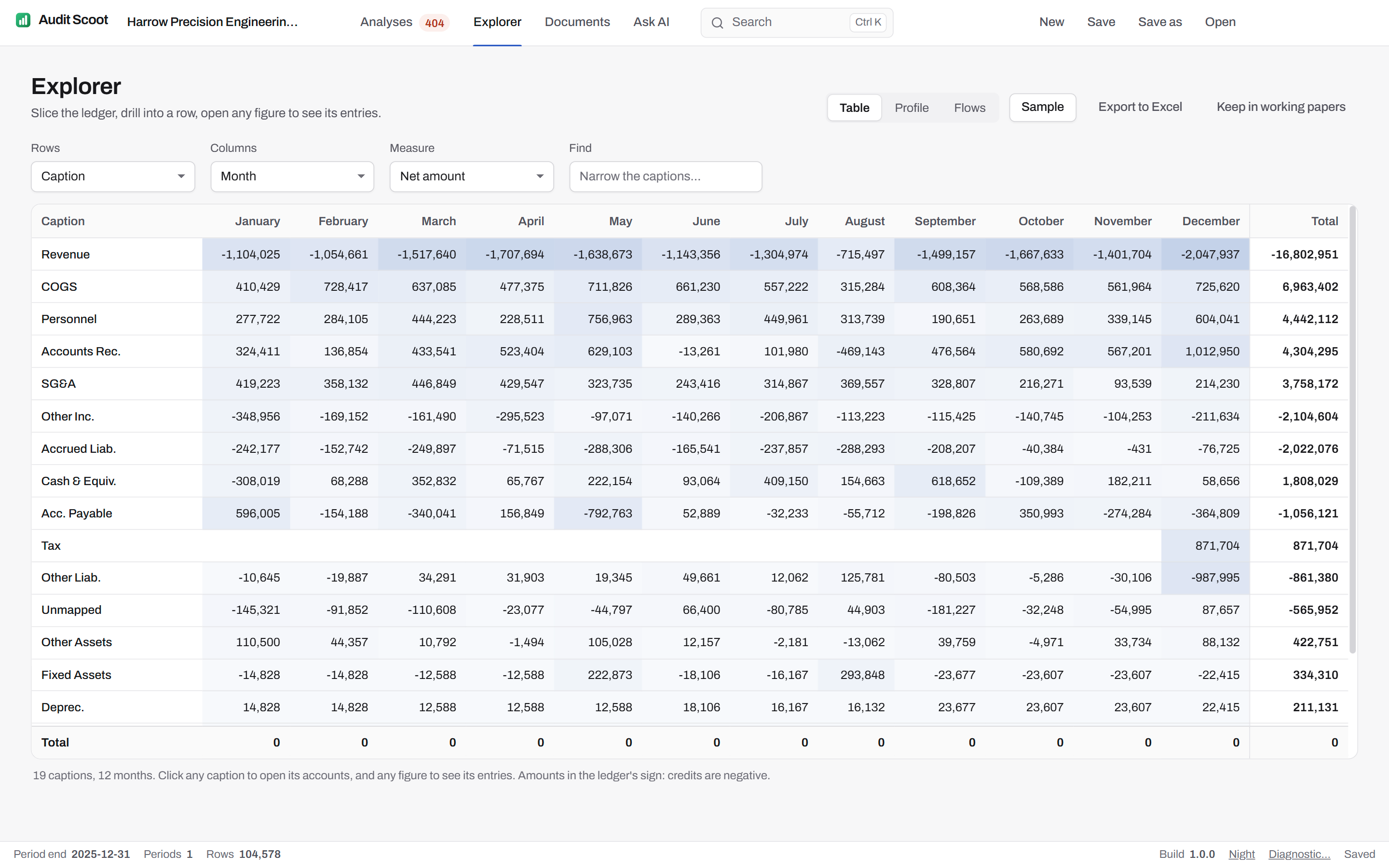
The Explorer in Audit Scoot on the demo engagement: the ledger by caption and month in net amount — revenue, cost of goods sold, personnel, receivables and the other captions across January to December, each figure shaded by size, with a total per caption.

A pivot of the whole ledger.

Rows and columns by caption, group, account, month, journal type, user or statement, in net amount, debits, credits, lines or entries. Click a row to open the next level down, any figure to list its lines, any line to read the whole journal. Each row carries its twelve-month trend; the view lives in the address, so Back undoes a drill.

This year against last

With last year's ledger loaded, Change lines the two years up with the difference and the percentage, the largest change first, against a band drawn at materiality — and one tick keeps only the changes over it.

Exported, or kept

Any table exports to Excel. "Keep in working papers" files it with the engagement under a reference, EX-001 onward, and the exported workbook carries it as its own tab.
  • 7ways to slice: caption, group, account, month, journal type, user, statement
  • 5measures: net amount, debits, credits, lines, entries
  • 4levels from a caption to the journal: caption, account, line, entry

The profile of any slice.

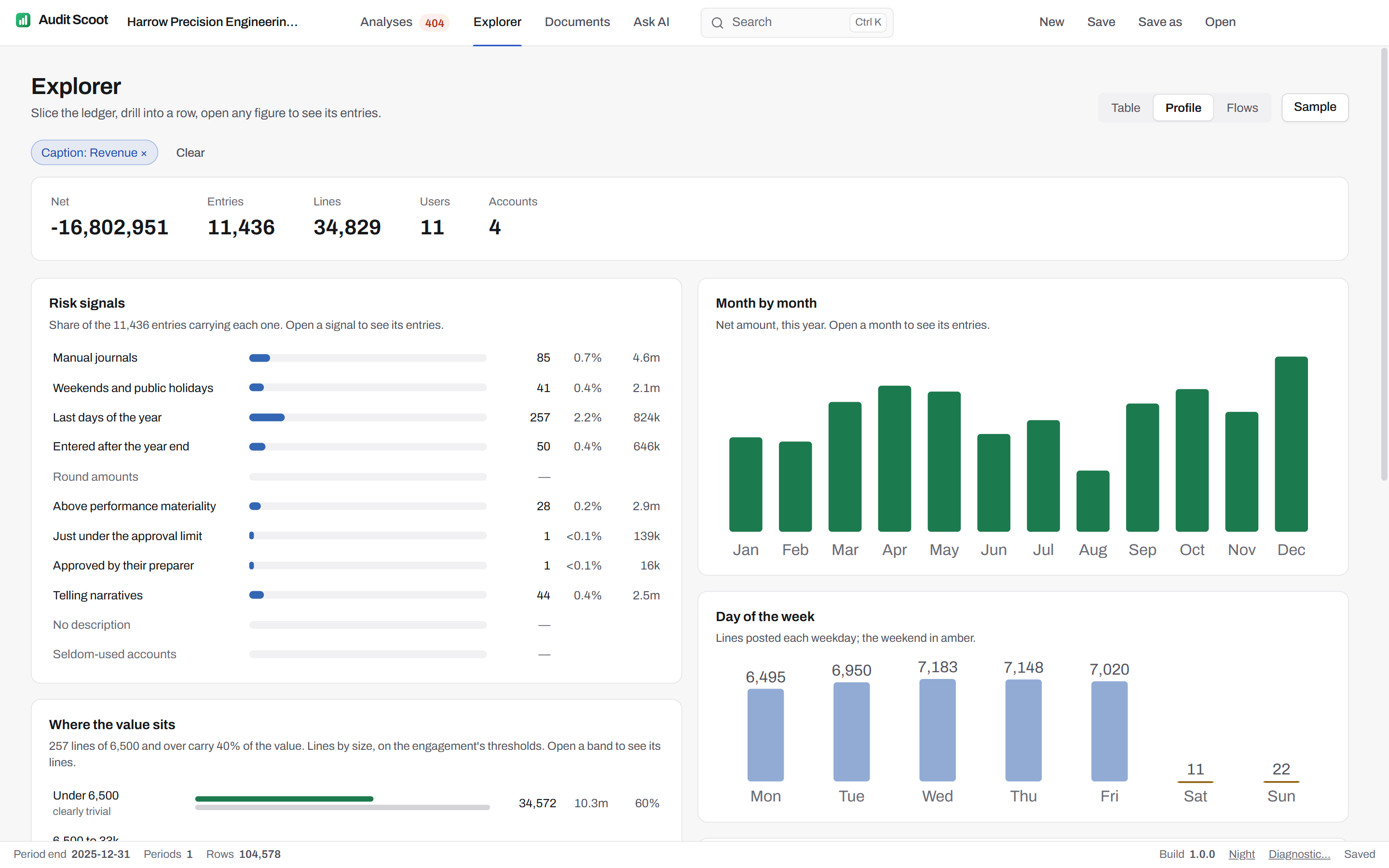
The questions to ask an account, a caption or a user before testing it, answered on one screen — and each mark opens its entries.

The profile of the Revenue caption in the Audit Scoot Explorer: 11,436 entries and 34,829 lines by 11 users on 4 accounts; risk signals with the share of entries carrying each, month by month, day of the week with the weekend in amber, and where the value sits on the engagement's materiality thresholds.

Risk signals

The share of the slice's entries carrying each of the signals journal entry testing asks about:

  • Manual journals
  • Weekends and public holidays
  • Last days of the year
  • Entered after the year end
  • Round amounts
  • Above performance materiality
  • Just under the approval limit
  • Approved by their preparer
  • Telling narratives
  • No description
  • Seldom-used accounts

Where the value sits

Lines stratified on the engagement's own thresholds — under clearly trivial, up to half of performance materiality, up to performance materiality, and above — with the share of the value in each band. The basis for choosing what to test, and how.

First digits

The Benford first-digit test on the slice, its conformity read on the mean absolute deviation as Nigrini sets the bands, and a digit outside the 99% band shown in amber. Each digit opens its lines.

When and by whom

Month by month against last year, the day of the week, and who posts when — with the users who posted to the slice this year and never last year named as new.

Booked against

The accounts on the other side of the slice's entries, and across the whole ledger the debit and credit pairings that last year never saw.

Where the money moved.

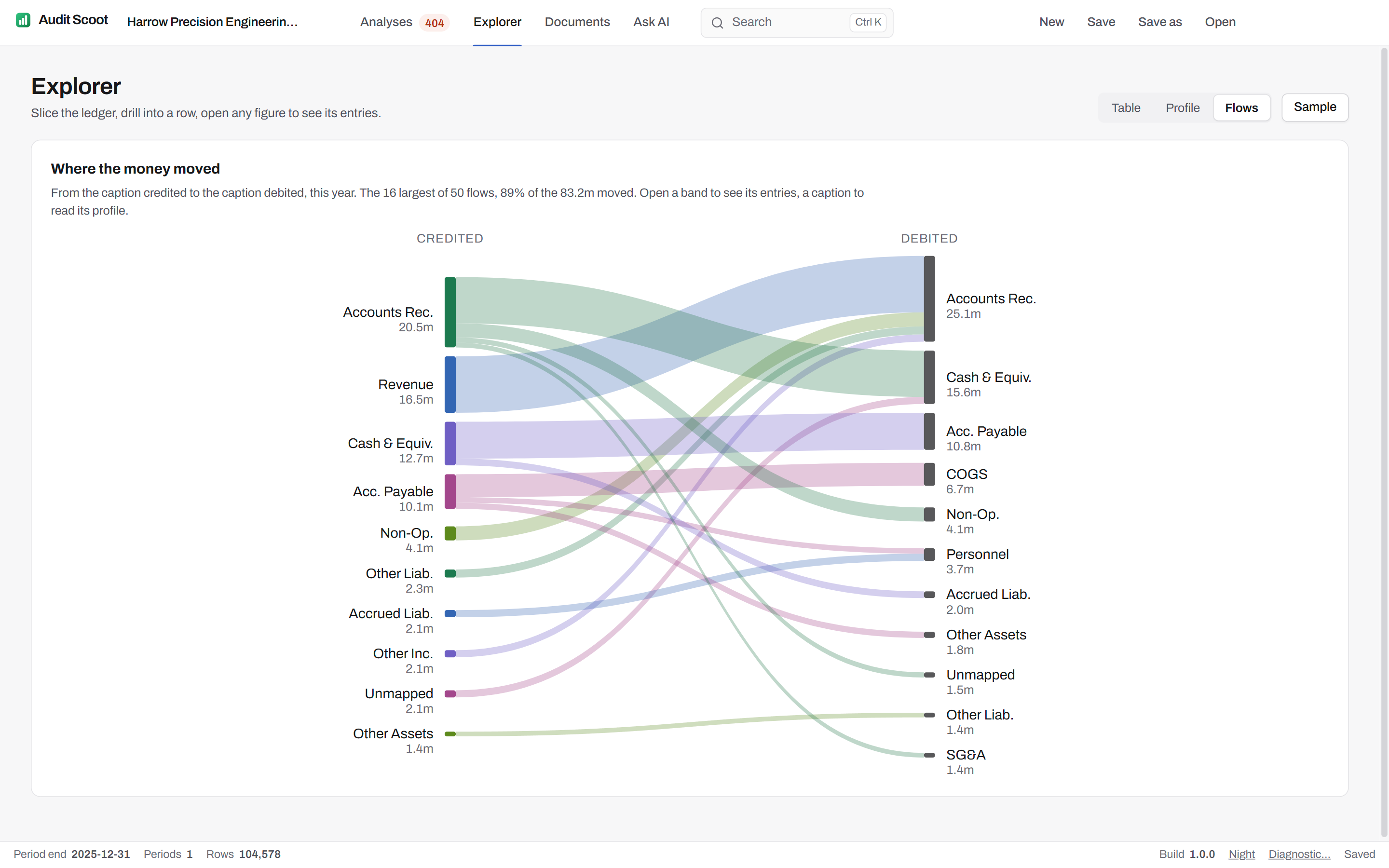
A map of the year from the caption credited to the caption debited, each entry prorated across its lines, so the routes the business takes — revenue to receivables, receivables to cash — stand out by their width, and the ones it should not take stand out by being there at all. With last year loaded, a flow the ledger did not have is drawn in amber.

A band opens its entries; a caption opens its profile.

The Flows view of the Audit Scoot Explorer: bands from the captions credited — accounts receivable, revenue, cash, payables — to the captions debited, sized by amount, the 16 largest of 50 flows carrying 89% of the 83.2 million moved.

A sample from any slice, drawn so it can be drawn again.

Sample from what is on screen — a caption, an account, a user, a month — on its debits, its credits or both. The method, the side and the seed are written on the sample, and the order is fixed, so a reviewer re-performing it gets the same lines.

  1. Monetary unit

    The interval is tolerable misstatement ÷ the reliability factor for 80, 90 or 95% confidence; a seeded start, then one unit every interval along the cumulative value. A line worth at least the interval is always selected, and says so.

  2. Random

    A set number of lines, ordered by a hash of their key and the seed. The same seed gives the same lines, on any machine.

  3. Above a threshold, then random

    Every line at or above a threshold — performance materiality unless you set another — and a set number more at random from the rest.

ISA 530 and AU-C 530 sampling, documented: each sample exports to Excel, and kept in the working papers it becomes a tab of the engagement's workbook under its EX reference.

Questions about the Explorer.

Can someone else draw the same sample again?
Yes. A sample states its slice, the side of the ledger it drew from, the method and the seed, and the order lines are taken in is fixed, so the same plan on the same ledger draws the same lines. The engagement keeps its seed, and a sample kept in the working papers is written into the exported workbook as it was drawn.
How is the monetary-unit interval set?
Tolerable misstatement divided by the reliability factor for the confidence chosen — 1.61 at 80%, 2.31 at 90%, 3.0 at 95% — at no expected misstatement, with a seeded start in the first interval. A line worth at least the interval is always selected, and the sample says so beside it. A plan that would select more than 2,000 lines is refused, with what to change.
Does the Explorer need last year's ledger?
No. With last year's ledger loaded it adds a This year / Last year / Change view, flags new account pairings and new users, and marks flows that did not exist last year; on a single year everything else works the same.
Where do the numbers come from?
From the same local copy of the ledger every analysis reads, after the account classification. Amounts are in the ledger's own sign — credits negative — and every figure opens the lines behind it.
Can an Explorer view go into the audit file?
Yes. "Keep in working papers" files the view or the sample with the engagement under a reference — EX-001, EX-002 — and the exported Excel workbook carries it as its own tab, as it stood when it was kept.

Run your next audit file test without the Excel crash.

One free engagement to evaluate, valid 60 days. The ledger never leaves the machine.

  • 20 minutes
  • Runs on a fictional engagement
  • No client data required

Cookie settings

This site sets no cookies. It keeps one preference in your browser's localStorage — the currency you chose on the pricing pages — and its analytics are cookieless, so there is nothing to opt in or out of.

View Cookie Policy