The whole ledger, analysed on your own machine.
Three setup steps, then every analysis the ledger can answer, run at once and filed by audit area. Open any figure to its entries, test the client's documents against the ledger, and export the working papers to Excel. A Windows application; nothing is uploaded.
Book a 20-minute demo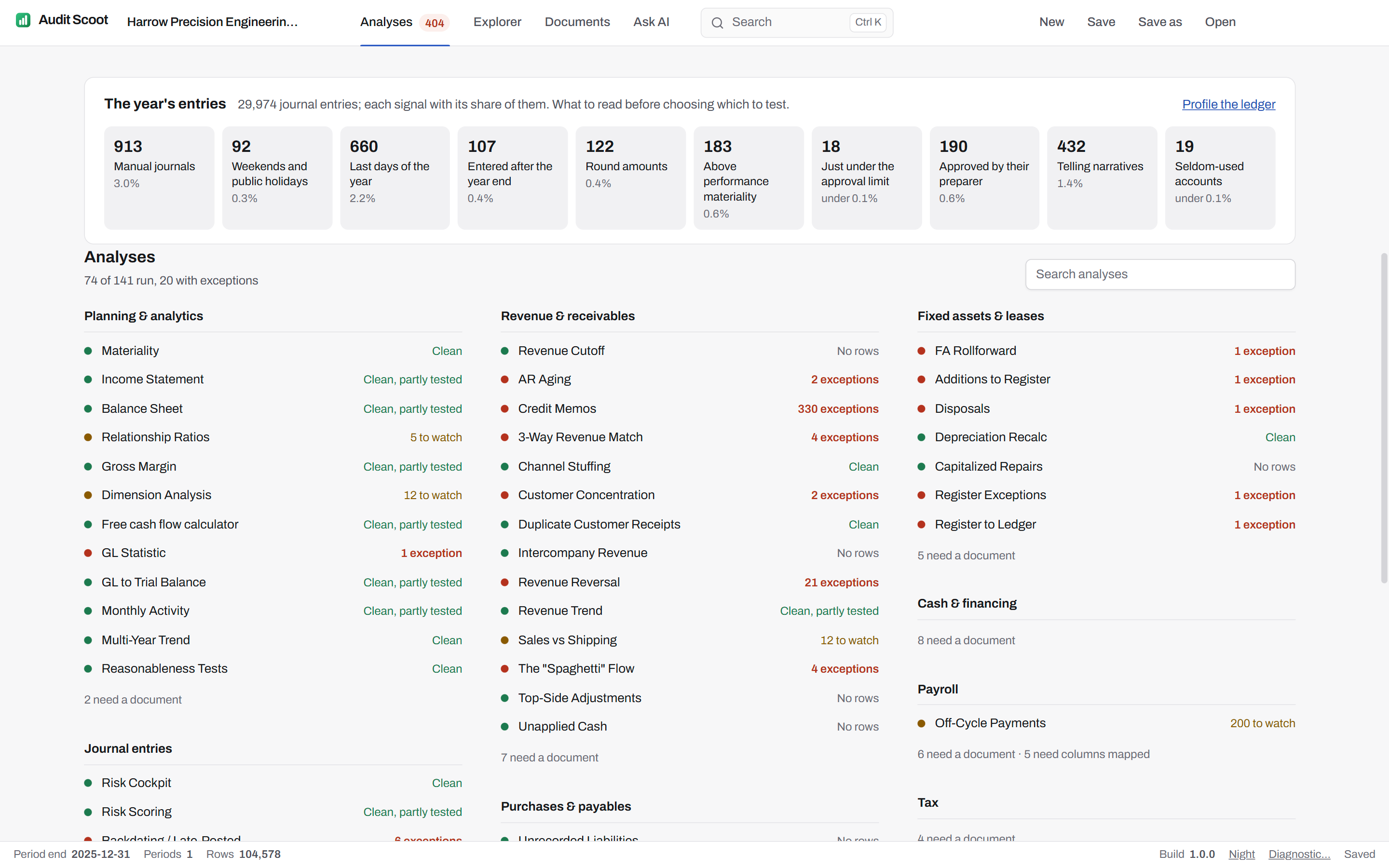
Set up once. Three steps.
The application's own steps, in its order. For a recurring client, "Start next year" carries last year's columns, accounts and materiality across, and setup goes straight to the analyses.
- Import
One ledger file per period, .xlsx or .csv — only the current year is required; last year's adds the comparatives. Name the engagement, its client, country and year end: the country picks the chart of accounts, the year end is the date every cut-off test measures against.
- Columns & accounts
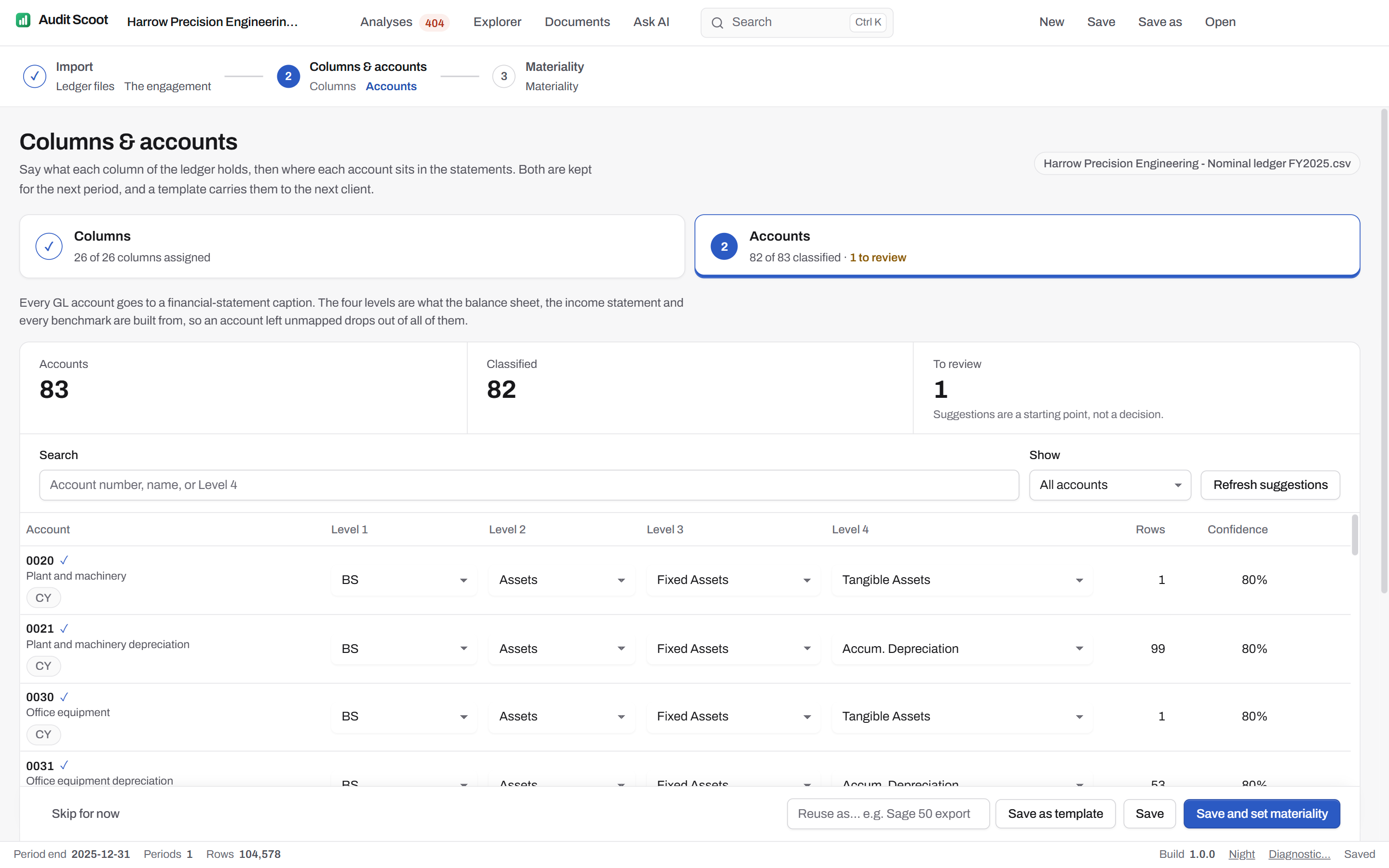
Say which column holds each field — the import recognises 10 accounting-system layouts and says which it read — then put every account on a statement caption, at four levels. Suggestions come with a confidence; what cannot be placed is counted as to review.
- Materiality
Overall and performance materiality, tolerable misstatement and the clearly trivial threshold, argued from the ledger's own benchmark. Every analysis that carries a threshold binds these figures.
Every account on a statement caption.
The balance sheet, the income statement and every benchmark are built from the account classification, so an account left unmapped would drop out of all of them. Audit Scoot reads the chart of accounts of the engagement's country — 34 of them, from the Plan Comptable Général to SKR 03 — suggests a caption for each account with a confidence, and counts what it cannot place as to review. Save the classification as a template for the next client on the same accounting system.
Twelve areas, every analysis run at once.
"Run all analyses" runs every worksheet the ledger and the loaded documents can answer and says, on the home page and in each area, what each one found: clean, to watch, or a number of exceptions. A test that could not fire on this ledger says "Not applicable" with the reason, not "Clean".
Each area — from planning and journal entries to completion — lists its key analyses first, opens a worksheet beside the list, and exports on its own. Every worksheet states the population it tested, draws the chart where one helps, and opens the Explorer on any row that names an account, a caption, a user or a journal.
The 132 analyses, by area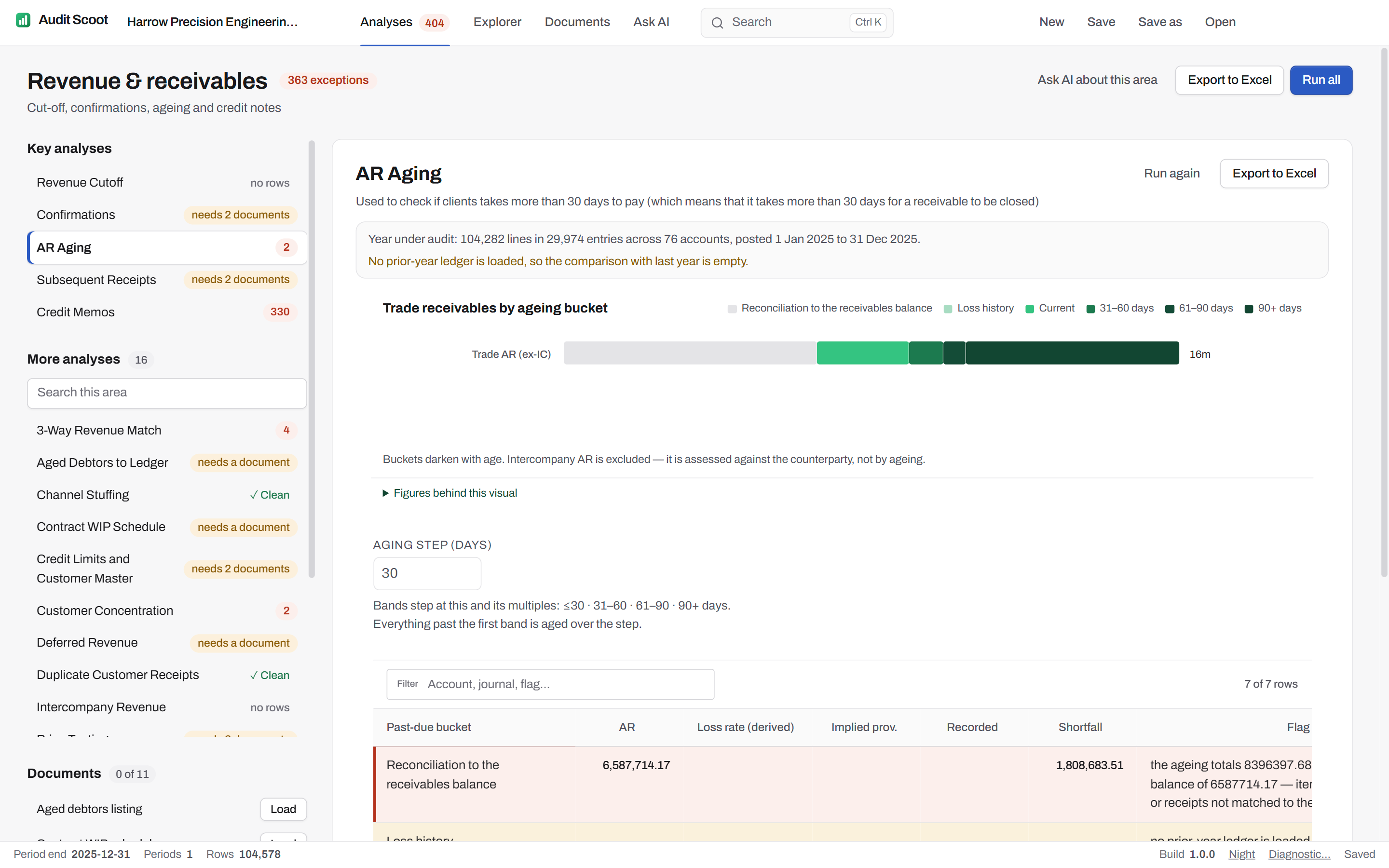
The client's documents, agreed to the ledger.
67 analyses test a population the ledger does not hold: the fixed-asset register, the aged debtors, the bank statements, the payroll register, the lease schedule. Load the client's export on the Documents page and it is agreed to the ledger balance it must match before any analysis reads it — the difference shown beside it — and the analyses waiting for it run.
The 63 documents, and where clients export them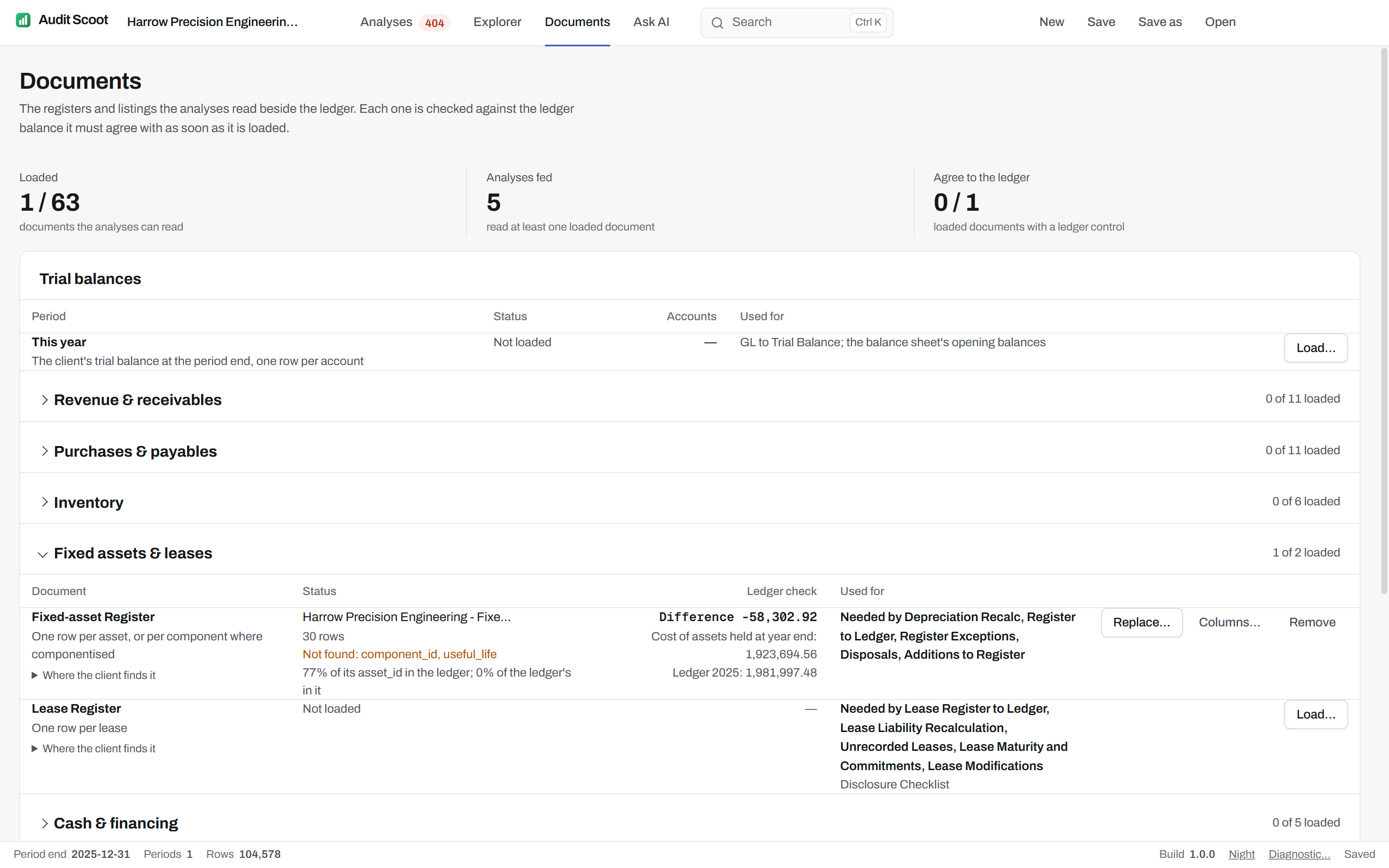
Journal entries selected by your criteria.
Choose the characteristics of the entries to select — manual, weekend or holiday, approved by their own preparer, no approver, entered after the year end, posted to a seldom-used account, just under the approval limit — and narrow by dates, journal types, preparers, value against tolerable error, narrative words or account pairs. Each box says how many entries it holds on its own as you tick it. The criteria are written on the worksheet, as AS 2401 and ISA 240 ask, and saved sets apply to every engagement.
Journal entry testing in Audit Scoot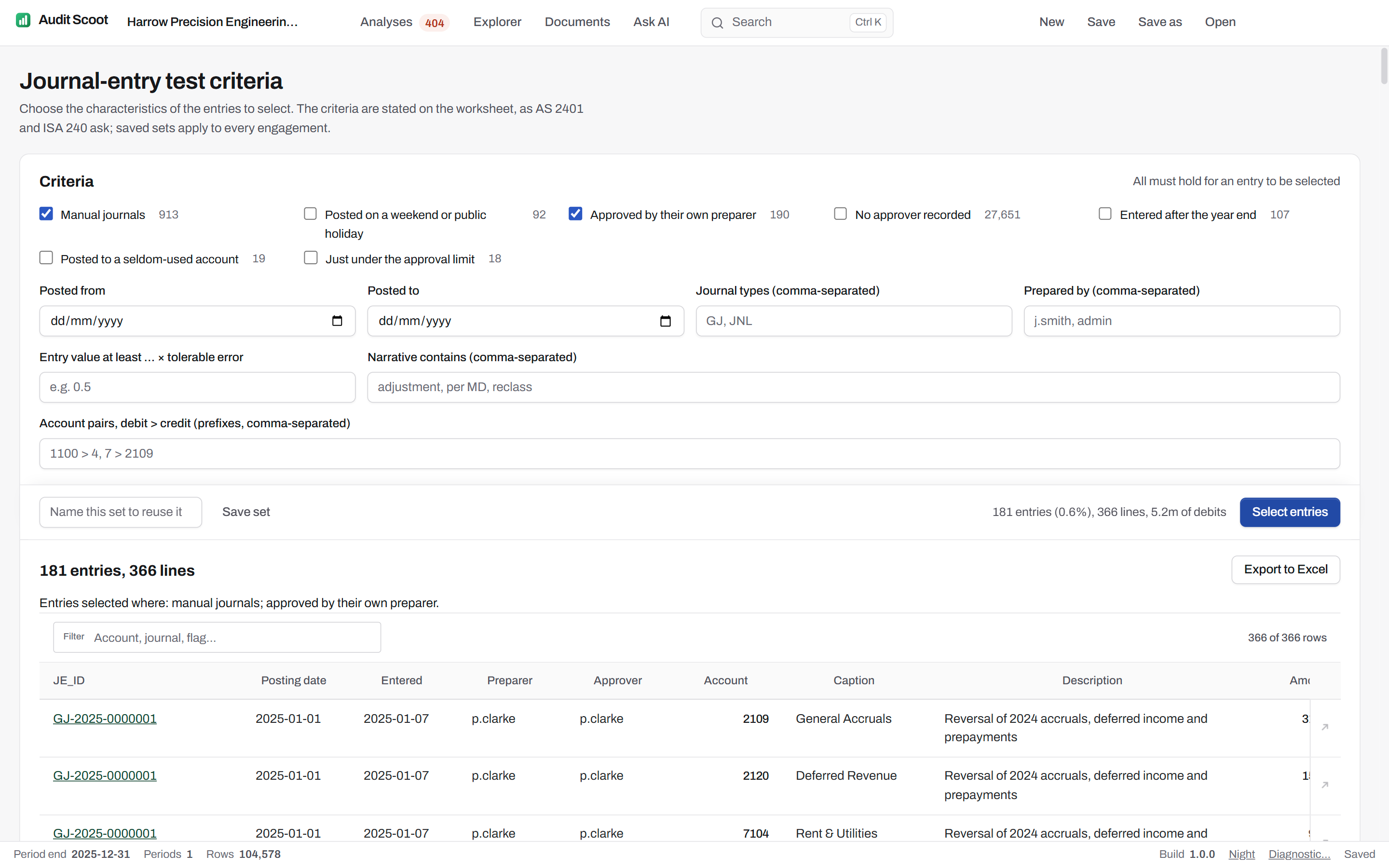
From any figure to its entries.
The Explorer pivots the ledger by caption, account, month, journal type or user and keeps going down — to the lines and the whole journal. Profile any slice for its risk signals, Benford's first digits and who posts when; see where its money moved; draw a monetary-unit or random sample that a reviewer can draw again.
Inside the Explorer- Table
- The ledger by any two dimensions, this year against last, with a materiality band
- Profile
- Risk signals, value bands, months, weekdays, users, offset accounts, first digits
- Flows
- Where the money moved, caption to caption, new flows in amber
- Sample
- Monetary unit, random or above a threshold, seeded and kept in the working papers
Ask for an analysis in plain English.
When the catalogue does not hold the test you have in mind, describe it — or start from the question suggested for each area. Google's Gemini model writes the SQL from your question and a profile of the columns, never a ledger row; the application validates it, runs it locally, read-only, and returns a worksheet with a chart. Follow up to narrow or regroup it. Every analysis it builds is kept with the engagement, so it can be re-performed on the ledger without asking the model again, and your firm's IT can turn the assistant off.
Exactly what the assistant sends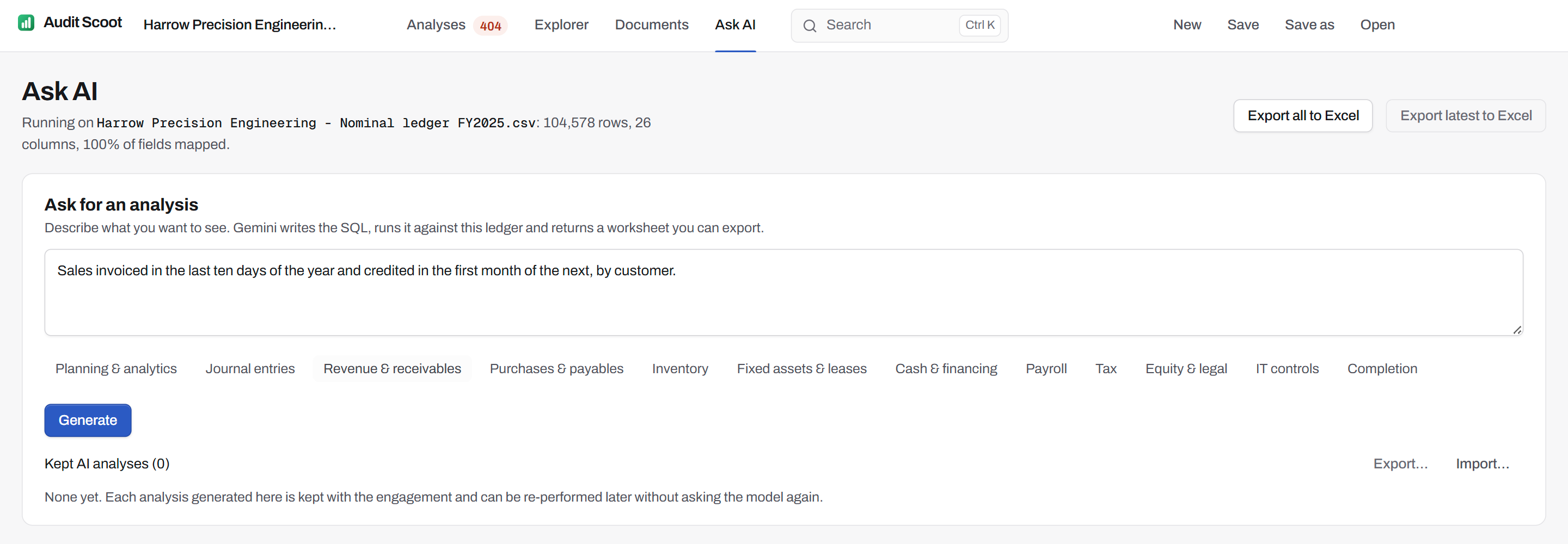
Working papers in one workbook.
"Export to Excel" writes every analysis that ran into one indexed workbook. Its index prints each source file with its SHA-256 fingerprint and the ledger's control totals — lines, entries, debits and credits — then lists every tab by its reference, filed under its area's letter as the application files it: A-01, B-01, C-01. Each tab states what it tested, and the Explorer views and samples you kept follow under EX-001 onward.
The engagement itself is one .auditscoot file holding its periods, mapping, classification, materiality and an audit trail of its changes, each under the Windows account that made it — kept wherever your firm keeps working papers.
- 00Index — sources, SHA-256, control totals
- A-01Materiality
- B-01Risk Cockpit
- C-01Revenue Cutoff
- F-01FA Rollforward
- EX-001Sample, Revenue
| Input | The general ledger, .xlsx / .csv, one file per period; the client's trial balances; client documents as Excel, CSV or PDF |
| Recognised layouts | Xero Account Transactions report, Xero General Ledger export, QuickBooks General Ledger report, Sage 50 Nominal Activity report, NetSuite General Ledger search, Business Central General Ledger Entries, SAP line items (FBL3N), French FEC, DATEV export, Exact Online export |
| Output | Excel worksheets, one indexed Excel workbook per engagement or area, the .auditscoot engagement file |
| Installation | Per user — no admin rights needed |
| Internet | Not required — no network connection by default; only the optional AI analysis goes online |
System requirements
| Component | Minimum | Recommended |
|---|---|---|
| Operating system | Windows 10 64-bit (version 1809 or newer) | Windows 11 64-bit |
| Processor | x64, dual-core | x64, quad-core |
| Memory | 8 GB RAM | 16 GB RAM |
| Disk | ~1 GB free (app ≈ 300–400 MB) plus room for engagement files | SSD, 2 GB+ free |
| Display | 1366 × 768 | 1920 × 1080 |
16 GB is recommended because the ledger is analysed in memory: the largest engagements use the most.
What the application does and does not do.
What does Audit Scoot actually test?
Do we need access to the client's system?
How large a ledger can it handle?
Can we run a test that is not in the catalogue?
What does it produce for the audit file?
Does it manage the audit file — sign-offs, review notes, client requests?
What are the system requirements?
Does it work offline?
Run your next audit file test without the Excel crash.
One free engagement to evaluate, valid 60 days. The ledger never leaves the machine.
- 20 minutes
- Runs on a fictional engagement
- No client data required