Journal entry testing on every line of the ledger.
Select the entries by the characteristics ISA 240 and AS 2401 point to, see how many each one holds before you tick it, and keep the criteria on the worksheet. Then run the 21 analyses of the Journal entries area on the same population — all on your own machine.
Criteria, stated on the worksheet.
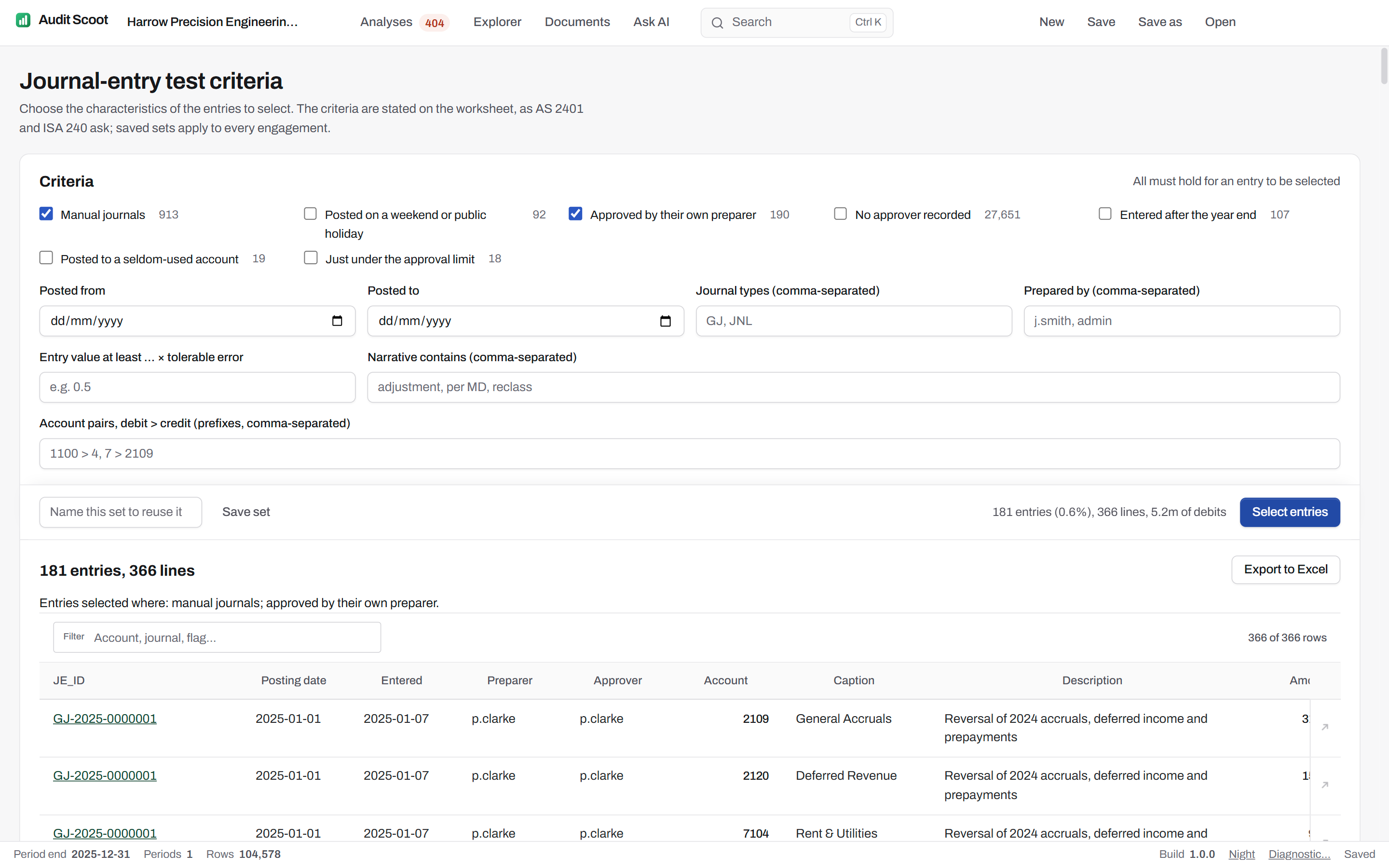
Tick the characteristics of the entries to select — all must hold for an entry to be selected:
- Manual journals
- Posted on a weekend or public holiday
- Approved by their own preparer
- No approver recorded
- Entered after the year end
- Posted to a seldom-used account (five entries or fewer all year, as PCAOB AS 2401 describes)
- Just under the approval limit (within 10% below it)
Then narrow by posted from / to, journal types, prepared by, entry value at least a multiple of tolerable error, narrative contains, account pairs, debit to credit. Each box says how many entries it holds on its own, and the total updates as you type.
The year's entries, before you choose.
The engagement's home page counts the year's journal entries against ten signals — manual, weekend, the last days of the year, after the year end, round amounts, above performance materiality, just under the approval limit, approved by their preparer, telling narratives, seldom-used accounts — each with its share of the population. What to read before choosing what to test; one click profiles the ledger in the Explorer.
The profile of any slice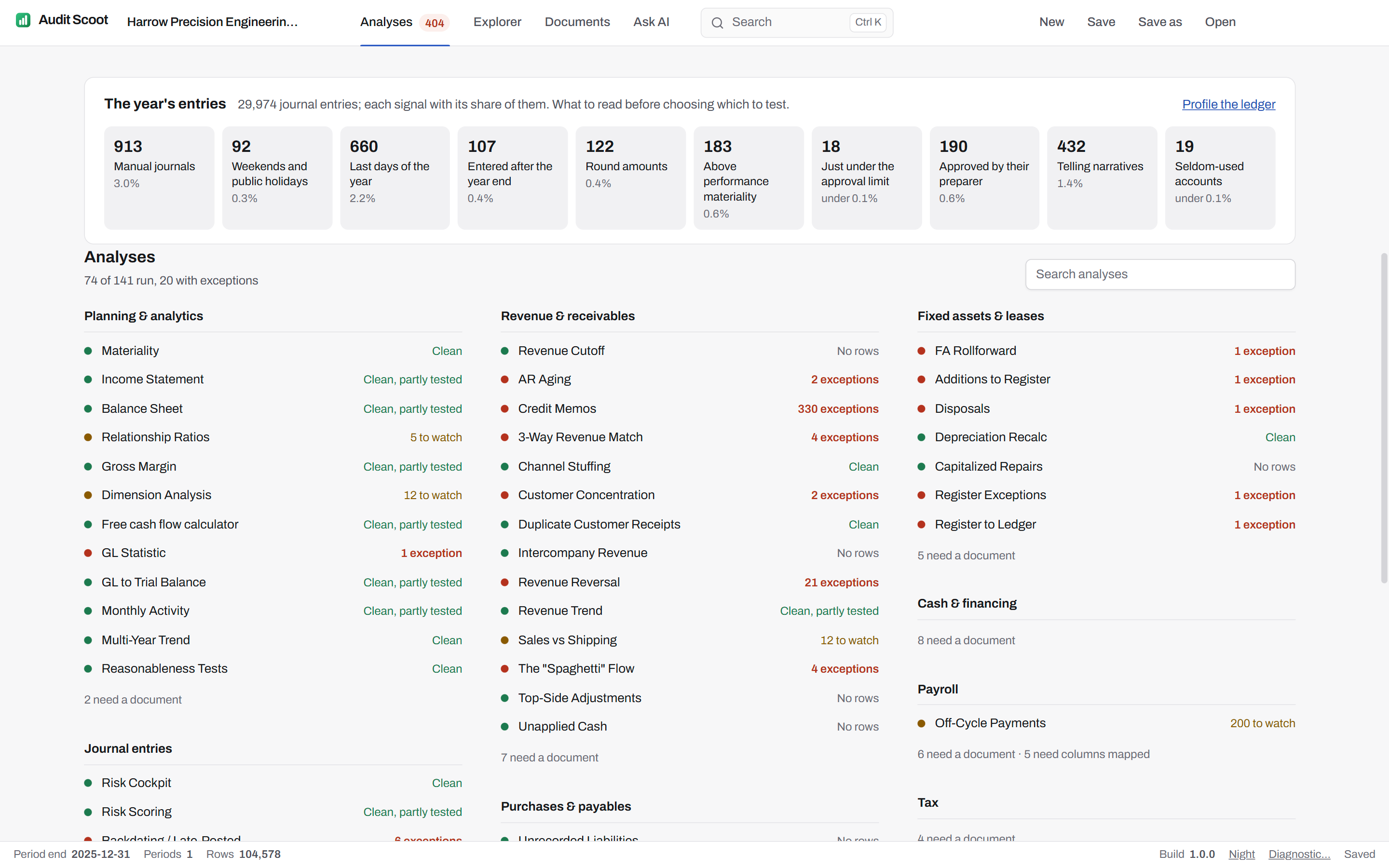
Journal entries: 21 analyses on the whole population.
Area B of the catalogue — risk scoring and journal entry testing. Each one runs on the general ledger alone.
- Risk CockpitEach caption's journal lines carrying the risk model's markers, valued by the assertion they threaten and read against performance materiality, with the worksheets that test each.
- Risk ScoringVisualize the shape of the entire risk-scored population at once.
- Backdating / Late-PostedDistinguish entries posted on the actual day from entries whose posting date was deliberately set to an earlier period.
- Suspense & Clearing AccountsItems still open at the year end in accounts that should be empty — suspense, clearing and the catch-alls QuickBooks and Xero create — each listed with its age.
- JE Number GapsVerify journal entry numbering integrity — a missing number can mean a deleted entry.
- Benford 1st DigitTest whether amounts follow the natural distribution that occurs when numbers arise organically.
- Benford's Law (2-Digit)Extend the leading-digit test to the second digit, as supporting analytics against approval thresholds.
- ClusteringIdentify account-to-account posting patterns that occur so rarely they fit no normal business process.
- ExplainabilityProduce a documented breakdown of why any flagged entry received its score.
- Header/Line ConflictFind entries approved by the person who prepared them, and preparers who post to both revenue and the cash or receivable that settles it.
- JE Line ItemsNarrow the full line population to the subset worth a human reading.
- JE SummaryCollapse individual lines to one row per journal entry.
- Keywords: "Bribery"Search professional-fee entries for terms associated with bribery and facilitation payments, such as gift, facilitation or consulting.
- Keywords: "Concealment"Search entry descriptions for the vague terms used to hide what an entry really is — fix, misc, adjustment, error, per CFO, reclass.
- Manual Adjustment RatioMeasure the share of manual journals per source module, where a high share points to a broken integration.
- Manual RevenueList revenue booked by manual journal rather than through the sales module.
- Risk-Based JETurn individual flags into one combined score per entry.
- Round Number SpikesFlag round-thousand amounts in the accounts where estimates and improper payments tend to sit, such as professional fees, marketing and gifts.
- TE ThresholdFormalize how much work each caption deserves — balance sheet and P&L alike.
- The "Slow Close"Measure how long after the period end entries are still being posted.
- Weekend WarriorsFind entries made at the weekend by people rather than by automated systems.
Journal entry testing, answered.
Which standards does the journal entry testing follow?
Does it test the whole population or a sample?
What if the ledger has no approver or preparer column?
How are opening balance entries handled?
Can we save our firm's criteria?
Run your next audit file test without the Excel crash.
One free engagement to evaluate, valid 60 days. The ledger never leaves the machine.
- 20 minutes
- Runs on a fictional engagement
- No client data required